Analyzing Price Time Gaps in MQL5 (Part II): Creating a Heat Map of Liquidity Distribution Over Time - MQL5 Articles

[
\
Install the app and receive market analytics and trading tips.\
\
MetaTrader 5 / Indicators
In the first part, we examined the concept of time gaps and their connection with institutional trading activity. However, detecting these gaps is only half the task. To trade effectively, a trader needs to see the full picture: where the price spends a lot of time, where it spends little time, and how these zones interact with each other.
This is where our indicator comes in – a tool that turns invisible time patterns into a visual heat map. While in the first part we were looking for anomalies (gaps), now we are constructing a complete map of normal price behavior.
The basic idea is simple: represent the entire price range as a set of micro-zones and, for each zone, calculate how long the price was in it. The longer the time, the "hotter" the zone, the more important it is for the market. The result is visualized through a color scheme from cool red to hot blue.
Mathematical foundation: From chaos to order
Any market can be viewed as a continuous struggle between supply and demand. Where this struggle is most intense, price tends to remain longer. Mathematically, this is expressed through the time density function:
T(p) = Σt_i, where the price is in the range [p-δ, p+δ]
Here p is the price level under study, δ is the size of the analysis zone, while t_i is the duration of each period the price is in this zone.
But the raw data tells little. We need normalization which will convert absolute time values into relative percentages. We use the formula:
P(p) = ((T(p) - T_min) / (T_max - T_min)) × 99% + 1%
This formula ensures that the "coldest" zones are assigned a 1% presence value, while the "hottest" ones reach 100%. All other zones will be distributed between these extremes in proportion to their importance.
Solution architecture: Modularity as the basis for reliability
Creating such an indicator requires a well-thought-out architecture. At the core is the PriceLevel structure, which encapsulates all information about each price level:
1struct PriceLevel
2{
3    double      price;             // Central price level
4    double      price_high;        // Zone upper boundary
5    double      price_low;         // Zone lower boundary
6    long        time_spent;        // Accumulated time in bars
7    double      presence_percent;  // Presence percentage
8    color       level_color;       // Dynamic color
9    string      object_name;       // Unique ID
10};
Each level has its own life: it accumulates time, recalculates percentages, and changes color. It is not just a data structure - it is the living essence of the market.
The key innovation was the use of a sliding analysis window. Instead of processing the entire available history (which could take seconds), we analyze only the latest MaxHistory bars through a window the size of AnalysisPeriod. This ensures that the results are relevant and the performance is acceptable.
Algorithm: Math meets reality
The process begins with determining the price range for analysis. The algorithm automatically finds the maximum and minimum for the studied period, which allows it to adapt to the volatility of any instrument.
This range is then divided into equal zones. The number of zones is calculated dynamically: if the tick size is specified, it is used; if not, the minimum Point of the instrument is taken. At the same time, the system balances between detail (at least 50 levels) and performance (no more than 1000 levels).
The most resource-intensive part is counting the time at each level. A naive approach would require checking each bar against each level (O(n²) complexity). We optimized this to O(n×k), where k is the average number of levels affected by one bar.
1// Optimization: find only relevant levels for each bar
2int startLevel = MathMax(0, (int)((lowPrice - minPrice) / realTickSize));
3int endLevel = MathMin(totalPriceLevels - 1, (int)((highPrice - minPrice) / realTickSize) + 1);
4
5for(int levelIdx = startLevel; levelIdx <= endLevel; levelIdx++)
6{
7    if(DoesBarTouchLevel(highPrice, lowPrice, levels[levelIdx]))
8    {
9        levels[levelIdx].time_spent++;
10    }
11}
The DoesBarTouchLevel function checks the intersection of the High-Low range of the bar with the boundaries of the price level. The logic is simple: if the maximum of the bar is above the lower boundary of the level and the minimum of the bar is below the upper boundary, there is an overlap.
Color alchemy: Transforming numbers into images
After the time is calculated, the most creative part begins: converting the raw data into a color scheme. We use a five-step system: red (1%), orange (25%), yellow (50%), light-blue (75%), blue (100%).
Smooth interpolation occurs between key points. For example, a level with 37% presence will receive a color between orange and yellow. Interpolation works in RGB space:
1color InterpolateColor(color color1, color color2, double factor)
2{
3    // Decomposition into RGB components
4    int r1 = (color1 >> 16) & 0xFF;
5    int g1 = (color1 >> 8) & 0xFF;
6    int b1 = color1 & 0xFF;
7
8    // Linear interpolation of each channel
9    int r = (int)(r1 + (r2 - r1) * factor);
10    int g = (int)(g1 + (g2 - g1) * factor);
11    int b = (int)(b1 + (b2 - b1) * factor);
12
13    return (r << 16) | (g << 8) | b;
14}
The result is smooth color transitions that create a natural heat map of the market.
Visualization: From algorithm to chart
Each price level is displayed as a rectangle on the chart. Creating thousands of graphical objects is a technically challenging task that requires optimization.
Rectangles are placed from the start time of the analysis to the current moment, covering the entire area of interest. Each object is configured to work in the background: it does not interfere with chart analysis, is not highlighted when clicked, and is automatically redrawn when the zoom level changes.
The object management system includes a mechanism for clearing previous results before rendering new ones. This prevents the accumulation of "garbage" on the chart and ensures correct updating of the visualization.
In real time, performance is critical. The indicator uses several levels of optimization:
- The first level is lazy calculations. Recalculation occurs only when a new bar appears. The system tracks the time of the last update and starts calculations only when a change occurs.
- The second level is memory optimization. Data arrays are allocated once and reused. Data structures are designed for minimal memory consumption: longs are used instead of doubles for counters, and unnecessary string variables are avoided.
- The third level is algorithmic optimization. The sliding analysis window limits the amount of data processed. The adaptive level grid prevents the creation of an excessive number of zones.
Interpreting the results: What the colors mean
Red zones (1-25% presence) indicate areas that price passes through quickly. These are the potential time gap zones described in the previous article. Red zones often experience rebounds and false breakouts, so they require a cautious approach.
Orange and yellow zones (25-75%) represent areas of moderate activity. Here the price lingers periodically, but without obvious dominance.
These are transition zones that can become support or resistance, depending on the market context. These are the zones where trend-following trades often work best.
The blue and light blue zones (75-100%) are the main focus of our analysis. This is where the price spends most of its time, indicating high trading activity. These levels have a strong magnetic force: the price regularly returns to them, using them as a support for movement or a barrier to overcome.
The most effective strategy is trading bounces from blue zones. When the price approaches the area of maximum presence, the probability of a reversal is significantly higher than average. This works especially well in sideways markets, where the blue zones clearly define the channel boundaries.
Breakouts through yellow zones often signal continued movement. If the price easily passes through the medium presence area on good volume, it indicates that there is no serious resistance ahead.
Reversal setups are often most effective in red zones.
Combination with volume analysis greatly enhances the signals. When the blue zone coincides in time with high volume in the volume profile, a zone of maximum significance is created.
Customization for different markets: Versatility through adaptation
Forex with its high liquidity requires large AnalysisPeriod (300-500 bars) and MaxHistory (5000-8000 bars) values. The movements here are smoother, so a greater depth of analysis is needed to identify significant areas.
For stocks, moderate settings tend to work well: AnalysisPeriod 200-300 bars, MaxHistory 3000-5000 bars. The session structure creates natural pauses that are reflected well in the heat map.
Tick size ( TickSize) is critical for proper operation. Setting this value too low will result in excessive detail without any practical benefit.
Too high a value will result in missing important nuances. The value of 0 (automatic mode) is usually optimal - the system will automatically select the size based on the instrument's characteristics.
Transparency affects not only visual perception, but also performance. High values (70-90%) create a semi-transparent map that does not interfere with candlestick analysis, but requires more resources to render.
The 1000 level limit was introduced for a reason. MetaTrader 5 has limitations on the number of graphical objects, and exceeding reasonable limits leads to a slowdown in the interface without significantly improving the quality of analysis.
Integration with other tools: Synergy of methods
The heat map indicator works especially well alongside the volume profile. The coincidence of blue time zones with volume peaks creates areas of exceptional importance. Such zones often become key for long-term price movement.
Combination with Fibonacci levels gives interesting results. When important Fibonacci levels fall into the blue zones of the heat map, their importance increases many times over. This is natural: mathematical levels are supported by real price behavior.
Volatility indicators (such as Bollinger Bands) work well in conjunction with a heat map. Widening of the bands in the red zones often precedes strong moves, while narrowing in the blue zones indicates the accumulation of energy for a future breakout.
The next version of the indicator is planned to include machine learning to automatically optimize parameters for a specific instrument. The algorithm will analyze level performance statistics and adjust settings for maximum efficiency.
Integration with alert systems will allow you to receive notifications when prices approach key zones. This is especially useful for swing traders who cannot constantly monitor charts.
Exporting data to external systems will open up opportunities for creating trading robots based on heat maps. Robots will be able to use the strength of levels as an additional filter for entering a position.
Method philosophy: Time as a market currency
The indicator is based on a profound idea: time is the currency of the market. Traders spend their time as consciously as they spend their money. The more time spent at a given level, the more emotions, decisions and capital are associated with it.
This emotional attachment creates market memory. Even when the price moves away from a significant level, the memory of it remains in the subconscious of the participants.
When returning to this level, old memories awaken: for some, about profits, for others, about losses. These memories influence new trading decisions.
The heat map of time makes this invisible memory visible. It turns market psychology into math, emotions into algorithms, and intuition into data.
Conclusion: A new look at old truths
The indicator does not reveal new principles, it makes old ones clearer. Support and resistance levels have always existed, but now they can be measured and ranked by importance. The heat map shows where the market spends time, and therefore where the real strength lies.
Combined with the time gap indicator, this provides a comprehensive picture of the behavior of major participants: where they act quickly and where they linger. Together, these tools allow us to better understand market structure and make decisions based on logic rather than intuition.
In the next part, we will discuss how to combine all of this into a single trading system.
Translated from Russian by MetaQuotes Ltd.
Original article: https://www.mql5.com/ru/articles/18661
Attached files |
Heatmap_Time_Distribution.mq5(30.88 KB)
Warning: All rights to these materials are reserved by MetaQuotes Ltd. Copying or reprinting of these materials in whole or in part is prohibited.
This article was written by a user of the site and reflects their personal views. MetaQuotes Ltd is not responsible for the accuracy of the information presented, nor for any consequences resulting from the use of the solutions, strategies or recommendations described.
Qualified Investor of Kazakhstan and the Russian Federation.
Trading since 2016, algorithmic trading since 2019, machine learning and programming since 2021.
I develop expert advisors, trading robots, indicators, smart contracts, cryptocurrency token and coin codebases, business automation software, and turnkey AI models.
Currently working on an institutional-grade trading system for my own hedge fund and on my own AI blockchain.
Author of 100+ international articles published in different languages worldwide.
Other articles by this author
- Seasonality Indicator by Hours, Days of the Week, and Days of the Month
- Analyzing Price Time Gaps in MQL5 (Part I): Building a Basic Indicator
- Determining Fair Exchange Rates Using PPP and IMF Data
- Downloading International Monetary Fund Data Using Python
- CFTC Data Mining in Python and Building an AI Model
- Mining Central Bank Balance Sheet Data to Get a Picture of Global Liquidity
Last comments |
(4)
|
3 Jul 2025 at 09:42
It reminds me: I used to do this a long time ago,
In my opinion, you have just a little bit incomplete - it is left to reveal the regular structure (or show that it does not exist).
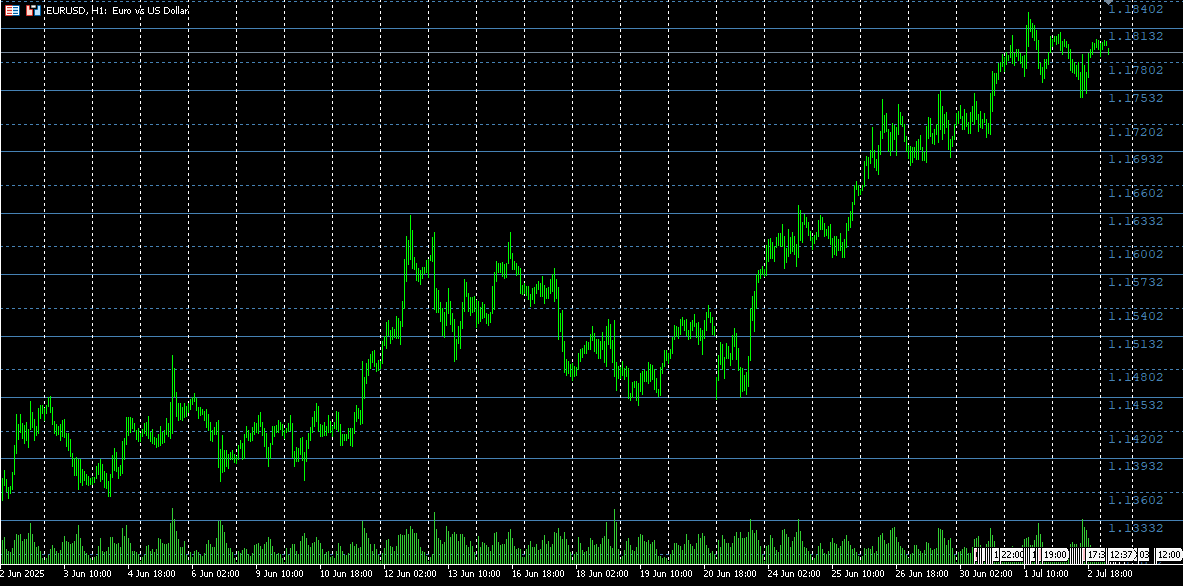
This is not a heat-map, of course - just the extrema of the regular part of a similar temperature map.
|
3 Jul 2025 at 14:27
How does this differ from the well-known " market profile" (other than colouring)?
|
3 Jul 2025 at 16:33
By the way, the map is calculated using the most labour-intensive and error-prone method.
Everything is simpler - for each candle 2 pairs {price,weight} : { price=high, weight=-1; } { price=low,weight=+1;} The collection is sorted by price, the sum with accumulation by weight is the heat map. Then it is quantised as you like.
|
15 Jul 2025 at 18:44
I decided to experiment with ChatGPT to bolt on a couple of "improvements" and create something useful for myself - this is what came out of it. The commented out part is my attempt to detect when the price enters one of the coloured zones and visually show its reaction. But the idea was to catch the shades of these colours: for example, when the zone is slightly brighter orange, according to my observations, the price goes sideways.
1//+------------------------------------------------------------------+
2//| Heat Map Plus - v3.00 modificada |
3//| Mantém buffer/alerts e adiciona ADX, stats e classificação |
4//+------------------------------------------------------------------+
5#property copyright "Chart Coloring by Time and Volume Distribution"
6#property link      "https://www.mql5.com"
7#property version   "3.00"
8#property indicator_chart_window
9#property strict
10
11#include <Math\Stat\Math.mqh>    // MathMean, MathStdDev
12#include <Indicators\Trend.mqh>     // ADX para filtrar tendência
13
14// buffers para EA
15#property indicator_buffers 3
16#property indicator_plots   0
17double LevelPriceBuffer[];
18double LevelStrengthBuffer[];
19double LevelTypeBuffer[];
20
21//--- Input parameters
22sinput group "=== Heat Map Settings ==="
23input int      AnalysisPeriod   = 500;
24input int      MaxHistory       = 10000;
25input double   TickSize         = 0;
26input bool     UseTickVolume    = true;
27input double   VolumeWeight     = 0.5;
28input int      SessStartHour    = 8;
29input int      SessEndHour      = 17;
30input double   MinBarRange      = 10;
31input bool     EnableAlerts     = true;
32
33//+------------------------------------------------------------------+
34//||
35//+------------------------------------------------------------------+
36sinput group "=== Colors (1%→100%) ==="
37input color    Color1Percent    = clrRed;
38input color    Color25Percent   = clrOrange;
39input color    Color50Percent   = clrYellow;
40input color    Color75Percent   = clrAqua;
41input color    Color100Percent  = clrBlue;
42input int      Transparency     = 70;
43
44//--- globals
45struct PriceLevel {
46 double price, price_high, price_low;
47 long   time_spent;
48 long   volume;
49 double presence_percent;
50 color  level_color;
51 string object_name; };
52PriceLevel      levels[];
53datetime        startTime, endTime, lastUpdate;
54int             totalPriceLevels = 0;
55long            maxTimeSpent = 0, minTimeSpent = LONG_MAX;
56long            maxVolume = 0,    minVolume    = LONG_MAX;
57bool            calculated = false;
58
59//--- ADX handle
60CiADX   adx;
61
62//+------------------------------------------------------------------+
63//| Initialisation|
64//+------------------------------------------------------------------+
65int OnInit() {
66// buffers para EA
67 SetIndexBuffer(0, LevelPriceBuffer);
68 SetIndexBuffer(1, LevelStrengthBuffer);
69 SetIndexBuffer(2, LevelTypeBuffer);
70 if(AnalysisPeriod < 50 || MaxHistory < AnalysisPeriod) {
71  Print("Parâmetros incorretos: 50 <= AnalysisPeriod <= MaxHistory");
72  return(INIT_PARAMETERS_INCORRECT); }
73 if(VolumeWeight < 0 || VolumeWeight > 1) {
74  Print("VolumeWeight deve estar em [0,1]");
75  return(INIT_PARAMETERS_INCORRECT); }
76// ADX(14)
77 if(!adx.Create(_Symbol, _Period, 14)) {
78  Print("Erro ao criar ADX");
79  return(INIT_FAILED); }
80 ArrayResize(levels, 0);
81 lastUpdate = 0;
82 calculated = false;
83 totalPriceLevels = 0;
84 return(INIT_SUCCEEDED); }
85
86//+------------------------------------------------------------------+
87//| Calculation|
88//+------------------------------------------------------------------+
89int OnCalculate(const int rates_total,
90                const int prev_calculated,
91                const datetime &time[],
92                const double &/*open*/[],
93                const double &high[],
94                const double &low[],
95                const double &/*close*/.[],
96                const long &tick_volume[],
97                const long &volume[],
98                const int &/*spread*/.[]) {
99 if(rates_total < AnalysisPeriod) return(0);
100// só recalcula em novo candle
101 if(lastUpdate == time[rates_total - 1]) return(rates_total);
102 lastUpdate = time[rates_total - 1];
103 calculated = false;
104 if(!calculated) {
105  // atualiza ADX
106  adx.Refresh(1);
107  // cálculo principal
108  CalculateTimeDistribution(time, high, low, tick_volume, volume, rates_total);
109  ColorChart();
110  ExportBuffers(rates_total);
111  calculated = true; }
112 return(rates_total); }
113
114//+------------------------------------------------------------------+
115//| Sliding-window + filtros de sessão e volatilidade |
116//+------------------------------------------------------------------+
117void CalculateTimeDistribution(const datetime &time[],
118                               const double &high[],
119                               const double &low[],
120                               const long &tick_volume[],
121                               const long &volume[],
122                               int rates_total) {
123 ArrayResize(levels, 0);
124 int historyStart = MathMax(0, rates_total - MaxHistory);
125 startTime = time[historyStart];
126 endTime   = time[rates_total - 1];
127// price range
128 double maxP = high[ArrayMaximum(high, historyStart, MaxHistory)];
129 double minP = low [ArrayMinimum(low,  historyStart, MaxHistory)];
130 double priceRange = maxP - minP;
131 if(priceRange <= 0) return;
132// tick size
133 double tk = (TickSize > 0 ? TickSize : Point());
134 totalPriceLevels = (int)(priceRange / tk);
135 totalPriceLevels = MathMin(1000, MathMax(50, totalPriceLevels));
136 double realTick = priceRange / totalPriceLevels;
137// init levels
138 ArrayResize(levels, totalPriceLevels);
139 for(int i = 0; i < totalPriceLevels; i++) {
140  levels[i].price       = minP + i * realTick;
141  levels[i].price_high  = levels[i].price + realTick / 2;
142  levels[i].price_low   = levels[i].price - realTick / 2;
143  levels[i].time_spent  = 0;
144  levels[i].volume      = 0;
145  levels[i].object_name = "HeatLevel_" + IntegerToString(i); }
146// percorre barras
147 for(int bar = historyStart; bar < rates_total; bar++) {
148  // filtro de sessão
149  int hr = TimeHour(time[bar]);
150  if(hr < SessStartHour || hr > SessEndHour) continue;
151  // filtro de volatilidade
152  double amp = (high[bar] - low[bar]) / Point();
153  if(amp < MinBarRange) continue;
154  long barVol = UseTickVolume ? tick_volume[bar] : volume[bar];
155  // find impacted levels
156  int st = MathMax(0, (int)((low[bar]  - minP) / realTick));
157  int en = MathMin(totalPriceLevels - 1,
158                   (int)((high[bar] - minP) / realTick));
159  for(int li = st; li <= en; li++) {
160   if(DoesBarTouchLevel(high[bar], low[bar], levels[li])) {
161    levels[li].time_spent++;
162    levels[li].volume    += barVol; } } }
163// acha min/max
164 maxTimeSpent = 0; minTimeSpent = LONG_MAX;
165 maxVolume    = 0; minVolume    = LONG_MAX;
166 for(int i = 0; i < totalPriceLevels; i++) {
167  long t = levels[i].time_spent;
168  long v = levels[i].volume;
169  if(t > maxTimeSpent) maxTimeSpent = t;
170  if(t > 0 && t < minTimeSpent) minTimeSpent = t;
171  if(v > maxVolume)    maxVolume    = v;
172  if(v > 0 && v < minVolume)    minVolume    = v; }
173 if(minTimeSpent == LONG_MAX) minTimeSpent = 0;
174 if(minVolume   == LONG_MAX) minVolume   = 0;
175// percentuais e cores
176 CalculatePercentsAndColors(); }
177
178//+------------------------------------------------------------------+
179//| Percents & cores|
180//+------------------------------------------------------------------+
181void CalculatePercentsAndColors() {
182 long tr = maxTimeSpent - minTimeSpent;  if(tr <= 0) tr = 1;
183 long vr = maxVolume    - minVolume;     if(vr <= 0) vr = 1;
184 for(int i = 0; i < totalPriceLevels; i++) {
185  double tp = levels[i].time_spent > 0 ?
186              ((levels[i].time_spent - minTimeSpent) / (double)tr) * 100.0 : 0;
187  double vp = levels[i].volume > 0 ?
188              ((levels[i].volume - minVolume) / (double)vr) * 100.0 : 0;
189  double comb = (1.0 - VolumeWeight) * tp + VolumeWeight * vp;
190  levels[i].presence_percent =
191   MathMax(1.0, MathMin(100.0, comb));
192  levels[i].level_color =
193   GetPercentageColor(levels[i].presence_percent); } }
194
195//+------------------------------------------------------------------+
196//| Chart Coloring + Alerts|
197//+------------------------------------------------------------------+
198
199//+------------------------------------------------------------------+
200//||
201//+------------------------------------------------------------------+
202void ColorChart() {
203 ClearPreviousObjects();
204 datetime nowTime = TimeCurrent();
205 double lastBid = SymbolInfoDouble(_Symbol, SYMBOL_BID);
206// Array de nomes de zona
207 string zoneNames[5] = {"", "Reversão.", "Tendência.", "Lateralização.", "Barreira" };
208// 1) Armazena ztype e preço médio
209 int    types[]; ArrayResize(types, totalPriceLevels);
210 double mids[];  ArrayResize(mids,  totalPriceLevels);
211 for(int i = 0; i < totalPriceLevels; i++) {
212  types[i] = (int)LevelTypeBuffer[ArraySize(LevelTypeBuffer) - 1 - i];
213  if(types[i] < 1 || types[i] > 4)
214   types[i] = 4;
215  mids[i] = (levels[i].price_low + levels[i].price_high) / 2.0; }
216// 2) Cria objetos de zona (retângulos colouridos)
217 for(int i = 0; i < totalPriceLevels; i++) {
218  string nm = levels[i].object_name;
219  // retângulo da zona
220  if(ObjectCreate(ChartID(), nm, OBJ_RECTANGLE, 0,
221                  startTime, levels[i].price_low,
222                  nowTime,   levels[i].price_high)) {
223   ObjectSetInteger(ChartID(), nm, OBJPROP_COLOR, levels[i].level_color);
224   ObjectSetInteger(ChartID(), nm, OBJPROP_BACK, true);
225   ObjectSetInteger(ChartID(), nm, OBJPROP_FILL, true);
226   ENUM_LINE_STYLE style = (Transparency > 50) ? STYLE_DOT : STYLE_SOLID;
227   ObjectSetInteger(ChartID(), nm, OBJPROP_STYLE, style);
228   ObjectSetInteger(ChartID(), nm, OBJPROP_WIDTH, 1); }
229  // alertas
230  if(EnableAlerts) {
231   static double lastPrice = 0;
232   bool cross = ((lastPrice < levels[i].price && lastBid >= levels[i].price) ||
233                 (lastPrice > levels[i].price && lastBid <= levels[i].price));
234   if(cross) {
235    Alert("HeatMap: preço cruzou nível ",
236          DoubleToString(levels[i].price, _Digits),
237          " [", zoneNames[types[i]], "]"); }
238   lastPrice = lastBid; } }
239//// 3) Agrupa por tipo contíguo e desenha uma linha por grupo
240// struct Segment {
241// int type;
242// int start;
243// int end; };
244// Segment segs[];
245// ArrayResize(segs, 0);
246// int currentType = types[0];
247// int segStart = 0;
248// for(int i = 1; i < totalPriceLevels; i++) {
249// if(types[i] != currentType) {
250// Segment seg;
251// seg.type = currentType;
252// seg.start = segStart;
253// seg.end = i - 1;
254// ArrayResize(segs, ArraySize(segs) + 1);
255// segs[ArraySize(segs) - 1] = seg;
256// currentType = types[i];
257// segStart = i; } }
258//// último segmento
259// Segment lastSeg;
260// lastSeg.type = currentType;
261// lastSeg.start = segStart;
262// lastSeg.end = totalPriceLevels - 1;
263// ArrayResize(segs, ArraySize(segs) + 1);
264// segs[ArraySize(segs) - 1] = lastSeg;
265//// 4) Desenha linha horizontal média por segmento
266// for(int j = 0; j < ArraySize(segs); j++) {
267// int s = segs[j].start;
268// int e = segs[j].end;
269// int type = segs[j].type;
270// // média dos preços médios
271// double avgPrice = 0;
272// for(int k = s; k <= e; k++)
273// avgPrice += mids[k];
274// avgPrice /= (e - s + 1);
275//// Criar linha horizontal
276// string lineName = StringFormat(zoneNames[types[s]] + "linha", s, e);
277// if(ObjectCreate(ChartID(), lineName, OBJ_HLINE, 0, 0, avgPrice)) {
278// ObjectSetInteger(ChartID(), lineName, OBJPROP_COLOR, clrWhite);
279// ObjectSetInteger(ChartID(), lineName, OBJPROP_WIDTH, 4);
280// ObjectSetInteger(ChartID(), lineName, OBJPROP_STYLE, STYLE_SOLID); }
281//// Criar texto à direita (último candle visível)
282// double textOffset = SymbolInfoDouble(_Symbol, SYMBOL_POINT) * 100; // deslocamento vertical acima da linha
283// double textPrice = avgPrice + textOffset;
284// datetime timeRight = iTime(_Symbol, _Period, 0); // tempo do candle mais recente
285// string textName = StringFormat(zoneNames[types[s]] + "texto", s, e);
286// if(ObjectCreate(ChartID(), textName, OBJ_TEXT, 0, timeRight, textPrice)) {
287// ObjectSetInteger(ChartID(), textName, OBJPROP_COLOR, clrBlack);
288// ObjectSetInteger(ChartID(), textName, OBJPROP_FONTSIZE, 10);
289// ObjectSetInteger(ChartID(), textName, OBJPROP_CORNER, CORNER_RIGHT_LOWER); // opcional se quiser em pixel
290// ObjectSetString(ChartID(), textName, OBJPROP_TEXT, zoneNames[types[s]]);
291// ObjectSetInteger(ChartID(), textName, OBJPROP_ANCHOR, ANCHOR_RIGHT); // ancora à direita do ponto
292// } }
293}
294//+------------------------------------------------------------------+
295//||
296//+------------------------------------------------------------------+
297int CountZLineObjects() {
298 int total = ObjectsTotal(ChartID());
299 int count = 0;
300 for(int i = 0; i < total; i++) {
301  string name = ObjectName(ChartID(), i);
302  if(StringFind(name, "ZLine_") == 0) // verifica se começa com "ZLine_"
303   count++; }
304 return count; }
305//+------------------------------------------------------------------+
306//| Exporta buffers para EA + classificação de zona |
307//+------------------------------------------------------------------+
308void ExportBuffers(int rates_total) {
309// monta array de stats
310 double stats[]; ArrayResize(stats, totalPriceLevels);
311 for(int i = 0; i < totalPriceLevels; i++)
312  stats[i] = levels[i].presence_percent;
313 double mean = MathMean(stats);
314 double sd   = MathStdDev(stats, mean);
315 if(sd <= 0) sd = mean * 0.1;
316 double adxValue = adx.Main(0);
317 int cnt = MathMin(totalPriceLevels,
318                   ArraySize(LevelPriceBuffer));
319 for(int i = 0; i < cnt; i++) {
320  // tipo de zona
321  double p = levels[i].presence_percent;
322  int ztype = 4; // BARREIRA por padrão.
323  if(p < mean - sd)                                 ztype = 1; // REVERSÃO
324  else if(p > mean + sd && adxValue >= 25.0)        ztype = 2; // TENDÊNCIA
325  else if(adxValue < 20.0)                          ztype = 3; // LATERALIZAÇÃO
326  LevelPriceBuffer   [rates_total - 1 - i] = levels[i].price;
327  LevelStrengthBuffer[rates_total - 1 - i] = p;
328  LevelTypeBuffer    [rates_total - 1 - i] = ztype; } }
329
330//+------------------------------------------------------------------+
331//| Helpers|
332//+------------------------------------------------------------------+
333bool DoesBarTouchLevel(double high, double low,
334                       const PriceLevel &L) {
335 return(high >= L.price_low && low <= L.price_high); }
336
337//+------------------------------------------------------------------+
338//||
339//+------------------------------------------------------------------+
340void ClearPreviousObjects() {
341 int tot = ObjectsTotal(ChartID());
342 for(int i = tot - 1; i >= 0; i--) {
343  string nm = ObjectName(ChartID(), i);
344  if(StringFind(nm, "HeatLevel_") == 0)
345   ObjectDelete(ChartID(), nm); } }
346
347//+------------------------------------------------------------------+
348//||
349//+------------------------------------------------------------------+
350color GetPercentageColor(double p) {
351 if(p <= 1.0)      return Color1Percent;
352 else if(p <= 25.) return InterpolateColor(
353                            Color1Percent,
354                            Color25Percent,
355                            (p - 1) / 24);
356 else if(p <= 50.) return InterpolateColor(
357                            Color25Percent,
358                            Color50Percent,
359                            (p - 25) / 25);
360 else if(p <= 75.) return InterpolateColor(
361                            Color50Percent,
362                            Color75Percent,
363                            (p - 50) / 25);
364 else              return InterpolateColor(
365                            Color75Percent,
366                            Color100Percent,
367                            (p - 75) / 25); }
368
369//+------------------------------------------------------------------+
370//||
371//+------------------------------------------------------------------+
372color InterpolateColor(color c1, color c2, double f) {
373 int r1 = (c1 >> 16) & 0xFF, g1 = (c1 >> 8) & 0xFF,
374     b1 = c1 & 0xFF;
375 int r2 = (c2 >> 16) & 0xFF, g2 = (c2 >> 8) & 0xFF,
376     b2 = c2 & 0xFF;
377 int r = int(r1 + (r2 - r1) * f),
378     g = int(g1 + (g2 - g1) * f),
379     b = int(b1 + (b2 - b1) * f);
380 return (r << 16) | (g << 8) | b; }
381
382//+------------------------------------------------------------------+
383//||
384//+------------------------------------------------------------------+
385int TimeHour(const datetime time) {
386 MqlDateTime dt;
387 TimeToStruct(time, dt);
388 return dt.hour; }
389//+------------------------------------------------------------------+
390//+------------------------------------------------------------------+
391//| DrawAndExport|
392//+------------------------------------------------------------------+
393//+------------------------------------------------------------------+
394//| Calcula a média de um array de double |
395//+------------------------------------------------------------------+
396double MathMean(const double &a[], const int count) {
397 if(count <= 0) return 0.0;
398 double sum = 0.0;
399 for(int i = 0; i < count; i++)
400  sum += a[i];
401 return sum / count; }
402//+------------------------------------------------------------------+
403//| Calcula o desvio padrão amostral de um array de double |
404//+------------------------------------------------------------------+
405double MathStdDev(const double &a[], const int count) {
406 if(count < 2) return 0.0;
407 double mean = MathMean(a, count);
408 double sumSq = 0.0;
409 for(int i = 0; i < count; i++)
410  sumSq += MathPow(a[i] - mean, 2);
411 return MathSqrt(sumSq / (count - 1));  // Desvio padrão amostral.
412}
413//+------------------------------------------------------------------+
Market Simulation (Part 24): Getting Started with SQL (VII)
In the previous article, we completed the necessary introduction to SQL. And, in my opinion, we properly clarified what we wanted to show and explain about SQL.
This was done so that anyone who comes to look at the replication/simulation system being built can at least get an idea of what may be happening there. The point is that there is no sense in programming things that SQL handles perfectly.
From Basic to Intermediate: Function Pointers
You have probably already heard about pointers when it comes to programming. But did you know that we can use this kind of data here in MQL5?
Of course, this must be done in a way that keeps us in control and avoids strange program behavior during execution. Still, because this is a resource with a very specific purpose and aimed at particular kinds of tasks, it is rare to hear anyone discuss what a pointer is and how to use it in MQL5.
From Basic to Intermediate: Objects (II)
In today's article, we will look at how to control some object properties in a simple way using code. We will also see how a custom application can place more than one object on the same chart. In addition, we will begin to understand the importance of assigning a short name to any indicator we plan to implement.
Market Simulation (Part 23): Getting Started with SQL (VI)
In this article, we will see how to visualize a database and, from that, understand how it is structured. This is done by analyzing the database’s internal structure.
Although this may seem unnecessary at first, it is fully justified if we really want to become database administrators. After all, some people make a living maintaining and designing databases.
%3A%20Creating%20a%20Heat%20Map%20of%20Liquidity%20Distribution%20Over%20Time%20-%20MQL5%20Articles&scr_res=800x600&ac=178065732882191067&fz_uniq=5137081456777895600&sv=2552)
This website uses cookies. Learn more about our Cookies Policy.
You are missing trading opportunities:
- Free trading apps
- Over 8,000 signals for copying
- Economic news for exploring financial markets
RegistrationLog in
latin characters without spaces
a password will be sent to this email
An error occurred
You agree to website policy and terms of use
If you do not have an account, please register
Allow the use of cookies to log in to the MQL5.com website.
Please enable the necessary setting in your browser, otherwise you will not be able to log in.